


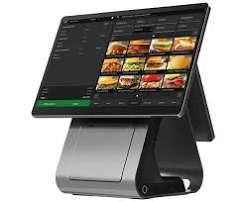

POS Systems Explained: What They Are and How to Choose One
Every sale, from a coffee to a laptop, ends at a checkout. A point of sale (POS) system is the combination of software and hardware that handles that moment, and for most shops it now does far more than take payment. Here is what a POS system does, what it consists of, and how to pick one that fits your business.
What Is a POS System?
A POS system lets a business record sales, accept payments and keep track of what happens afterwards. The old cash register did one job: it totalled a sale and opened a drawer. A modern POS connects the till to your stock, your customers and your accounts, so a single transaction updates several records at once.
The Main Parts
Most systems combine hardware and software.
Hardware usually includes a screen or tablet, a card reader, a receipt printer, a cash drawer and a barcode scanner. Which of these you need depends on the type of business. A market stall might use only a phone and a card reader, while a busy shop may need several terminals.
Software is the part that does the thinking. It stores your product list and prices, applies discounts and taxes, produces receipts and generates reports.
Payment processing is the service that moves money from the customer’s card to your bank. Some providers bundle this with the POS, while others let you choose your own.
Types of POS System
Cloud-based systems store data online and work through an internet connection. You can check sales from anywhere and updates arrive automatically. The drawback is that some features slow down or stop if your connection fails, so check whether the system has an offline mode.
Local (on-premise) systems keep data on your own equipment. They can run without the internet but need more setup and maintenance.
Mobile POS runs on a phone or tablet with a portable card reader. It suits market traders, pop-up stalls and delivery businesses.
Upgrade Your Business with Reliable Point of Sale Systems in Ireland — Simplify Transactions, Manage Sales, and Improve Business Efficiency.
Features Worth Paying For
- Inventory tracking: automatic stock counts and low-stock alerts reduce both overselling and wasted cash tied up in unsold goods.
- Reporting: sales by product, hour and staff member show what is working.
- Staff controls: individual logins and permission levels limit who can issue refunds or change prices.
- Customer records: simple loyalty tools and purchase history help you bring people back.
- Integrations: links to accounting software, online stores and delivery platforms save hours of manual entry.
- Age and compliance checks: if you sell age-restricted goods such as alcohol, tobacco or vaping products, a prompt that asks staff to verify age at the till can help you meet your legal duties.
How to Choose
- Start with how you sell. A restaurant needs table management and split bills, while a retailer cares more about barcodes and variants.
- Count the true cost. Compare the monthly fee, hardware cost, payment processing rates and any extra charges for support or add-ons. A cheap plan can become expensive once these are included.
- Test the ease of use. Staff will use it all day, so ask for a demo or free trial and let your team try it.
- Check support and contracts. Find out how help is provided, what happens if the system goes down, and whether you can leave without a heavy penalty.
- Plan for growth. Make sure you can add another terminal, location or sales channel later without starting again.
Common Mistakes
Many owners choose on price alone, skip the trial, or ignore how easily they can export their data if they later switch providers. Another frequent error is setting up products badly at the start. Taking time to enter accurate names, prices and tax rates saves trouble afterwards.
Frequently Asked Questions
What does POS stand for?
Point of sale: the place and moment where a customer pays for goods or services.
Do I need special hardware?
Not always. Many cloud systems run on an ordinary tablet with a card reader. Printers, scanners and cash drawers are optional extras.
Can a POS work without internet?
Some can. Local systems and certain cloud systems have an offline mode that stores sales and syncs them later. Ask about this before you commit.
How much does a POS system cost?
Prices vary widely depending on software plan, hardware and payment fees. Request a full written quote so you can compare like with like.
Is a POS system secure?
Reputable providers use encryption and follow card industry security standards. You should still use strong passwords, give staff separate logins and keep software updated.
Can I connect my POS to my online shop?
Many systems can sync stock and orders between a physical till and a website. Check which platforms your chosen system supports