


The development quote is only the beginning of what an ecommerce app costs. Many businesses budget carefully for the build and then find that the first year of running the app demands a second budget they never planned. The surprise is avoidable. Looking honestly at the full life of the product gives a more accurate picture of ecommerce app development cost, and it shows where genuine savings can be found without sacrificing quality.
This guide lists the expenses that most often go missing from plans, offers realistic budget buffers and explains the cost-saving strategies that work, along with the ones that backfire.
The Visible Cost: What the Quote Covers
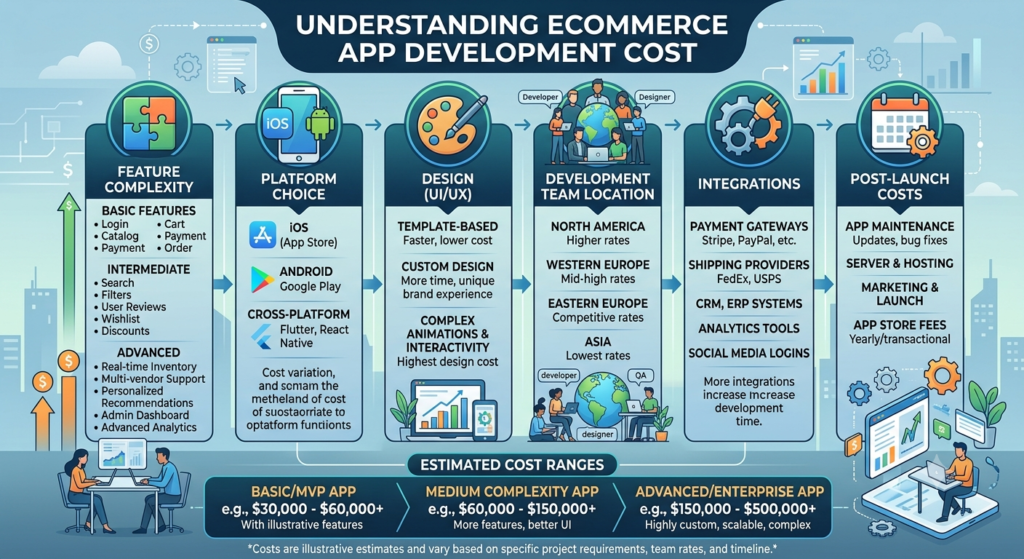
A typical quote covers discovery, design, development, testing and launch. For a basic ecommerce app that means roughly $20,000 to $50,000, for a medium-complexity app $50,000 to $120,000 and for an advanced platform $120,000 to $300,000 or more. Real-world examples help calibrate expectations: a simple online store may cost $25,000 to $50,000, a fashion retail app $80,000 to $150,000, a grocery delivery app $100,000 to $200,000 and an Amazon-style marketplace $200,000 to $500,000 or more.
These figures describe building the product. Everything below describes keeping it alive and growing.
Hidden Cost 1: Maintenance
Software is never finished. Operating systems update, devices change, libraries need security patches and customers expect improvements. A common planning guideline is to reserve 15 to 20 percent of the original build cost each year for maintenance. For mid-sized and larger apps, updates, patches and hosting together can reach $18,000 to $70,000 or more per year.
Ask every vendor to quote maintenance separately, including response times for critical issues and what is covered. A cheap build with expensive support is not a bargain.
Hidden Cost 2: Infrastructure and Third-Party Services
Servers, databases and content delivery cost money every month. After launch, infrastructure bills commonly range from about $50 per month for a small store to $5,000 or more for high-traffic platforms, and they grow with usage. Third-party services add further recurring fees: payment gateway charges, SMS and email providers, shipping APIs, analytics and customer support tools.
Backend development itself often consumes 35 to 45 percent of the total build. Server setup, APIs and databases can cost $5,000 to $20,000, admin panels $8,000 to $25,000 and integrations $5,000 to $30,000 or more, so scope these items explicitly rather than assuming they are included.
Hidden Cost 3: Security and Compliance
Protecting payment and personal data is non-negotiable. Encryption, secure payment flows, PCI compliance and privacy features commonly add $10,000 to $40,000, and enterprise apps may also need penetration testing, fraud detection and biometric login. IBM’s research has put the average cost of a data breach at about $4.45 million, so skipping security to save a small amount creates a risk far larger than the saving.
Hidden Cost 4: Marketing and Customer Acquisition
Building an app does not bring customers. App store optimisation, paid installs, email and push campaigns, influencer partnerships and promotional discounts all require budget. Many founders spend everything on development and have nothing left to promote the product. As a rule of thumb, decide the acquisition budget at the same time you decide the build budget.
Hidden Cost 5: Testing Devices, Tools and Subscriptions
Small items accumulate: developer accounts for Apple and Google, design and project-management tools, monitoring and crash-reporting services, test devices and licences for third-party libraries. Individually they are minor; together they can add thousands of dollars per year. Ask your vendor which of these are included in the quote and which you must provide under your own accounts.
Putting Numbers Around the Extras
The table below summarises the recurring and one-time items that often sit outside the build quote. Figures are indicative planning ranges.
| Item | Indicative cost | Frequency |
|---|---|---|
| Maintenance and updates | 15 – 20% of build cost | Annual |
| Infrastructure and hosting | $50 – $5,000+ per month | Monthly |
| Security and compliance | $10,000 – $40,000 | Mostly upfront, then ongoing reviews |
| Third-party integrations | $5,000 – $30,000+ | Setup plus usage fees |
| Contingency buffer | 25 – 30% of budget | Reserved up front |
Smart Ways to Reduce Cost Without Hurting Quality
Savings are available, provided you cut the right things.
- Launch a minimum viable product. Focusing on core features can reduce initial cost by 30 to 40 percent and gives you real user data.
- Use a cross-platform framework such as Flutter or React Native, which can lower cost by a further 30 to 40 percent compared with two native apps.
- Use proven third-party tools for non-differentiating functions, which can save $10,000 to $30,000 compared with custom builds.
- Consider outsourcing to an experienced offshore team, where savings of 50 to 60 percent are commonly reported.
- Prioritise features with a must-have, should-have, nice-to-have list and defer the rest.
What Not to Cut
Three areas deserve protection even when budgets are tight: security, user experience and quality assurance. Weak security invites breaches, poor UX lowers conversion and thin testing pushes bugs onto customers. Each of these costs far more to repair after launch than to build properly in the first place.
Finally, keep a contingency buffer of 25 to 30 percent. Scope grows, integrations behave unexpectedly and requirements change as you learn from users. A buffer turns those events from crises into manageable adjustments.
A Sample First-Year Budget Framework
To make this concrete, imagine a medium-complexity ecommerce app with a build cost of $80,000. Annual maintenance at 15 to 20 percent would be $12,000 to $16,000. A contingency buffer of 25 to 30 percent would be $20,000 to $24,000, set aside from the start. Infrastructure at an illustrative $300 per month would add $3,600 for the year, and you would also need a marketing budget agreed in advance. Together, the first year can cost materially more than the headline build figure.
This is only an example, and your numbers will differ. The point is to build a simple spreadsheet before you sign: build cost, maintenance, infrastructure, third-party fees, security reviews, marketing and contingency. Review it with your vendor and update it as the scope becomes clearer.
Questions to Ask Before You Commit
Ask each vendor what is included in the quoted price and what is not, how much they charge for maintenance after launch, what monthly infrastructure costs to expect at your projected traffic and how they handle security testing. Also ask who owns the cloud and developer accounts. Clear, specific answers are a strong indicator that you are dealing with a team that plans for the full life of the product.
Frequently Asked Questions
How much should I budget in the first year after launch?
Plan for maintenance at 15 to 20 percent of the build cost, plus infrastructure, third-party fees, marketing and a contingency reserve.
Is a buffer really necessary?
Yes. Almost every project meets unexpected requirements. A 25 to 30 percent buffer prevents delays caused by funding gaps.
Can I reduce maintenance costs?
Clean code, automated testing and good documentation lower long-term maintenance effort, so invest in them early.
Conclusion
The true price of an ecommerce app includes the build, the first year of operation, security, marketing and a safety margin. Looking at ecommerce app development cost through that wider lens prevents nasty surprises and shows where savings are genuine: MVP scope, cross-platform development, smart use of third-party tools and experienced offshore teams. Budget for the whole life of the product, protect security and quality, and keep a buffer, and your app will have the resources it needs to succeed after launch.